MTD for Income Tax: what changes for you in April 2027
Last updated: 18 October 2026
If your income from self-employment and property was over £30,000 on your 2025 to 2026 tax return, Making Tax Digital for Income Tax (MTD for Income Tax) applies to you from 6 April 2027. From that date you keep your business records in software, send HMRC a short summary every three months, and file your tax return from that same software.
It sounds like a big change, but most of it is about how you report, not how much tax you pay. Here is what changes, the dates that matter, and a simple plan to get ready.
Key takeaways
- MTD for Income Tax starts on 6 April 2027 if your qualifying income on your 2025 to 2026 return is over £30,000.
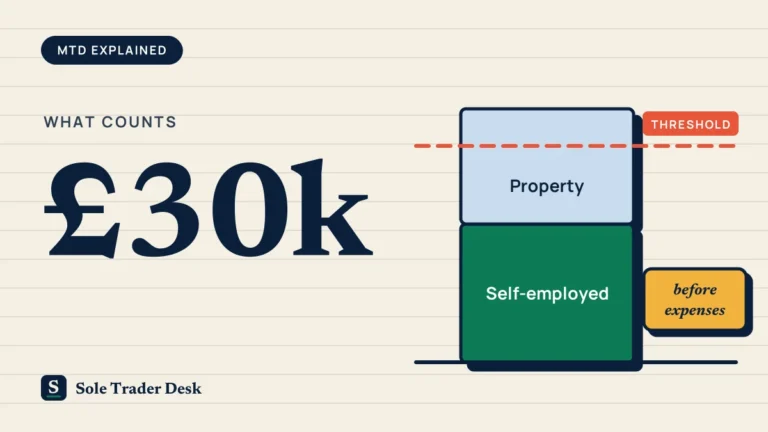
- Qualifying income is your turnover from self-employment and property, before expenses. It is not your profit.
- You will keep digital records and send four quarterly updates a year. The first one is due by 7 August 2027.
- Your 2027 to 2028 tax return is filed through your software by 31 January 2029.
- HMRC does not provide its own MTD software, so you will need a compatible product (free options exist).
Does MTD for Income Tax apply to you from April 2027?
MTD for Income Tax is being rolled out in stages. Which stage you are in depends on your qualifying income on a particular Self Assessment return.
| Qualifying income | Based on your return for | You start on |
|---|---|---|
| Over £50,000 | 2024 to 2025 | 6 April 2026 |
| Over £30,000 | 2025 to 2026 | 6 April 2027 |
| Over £20,000 (planned) | 2026 to 2027 | 6 April 2028 |
So if your 2025 to 2026 return (due by 31 January 2027) shows qualifying income over £30,000, April 2027 is your start date. HMRC says it will write to people who need to join, but you are still responsible for checking even if no letter arrives.
Not sure which row you are in? Use our quick MTD date checker.
What counts as qualifying income?
Qualifying income is your total income from self-employment and property before you take off any expenses. If you are both a sole trader and a landlord, the two are added together.
- Counts: sole trader turnover, rental income, and your share of income from a property you own jointly.
- Does not count: wages from a job (PAYE), dividends, State Pension and private pensions, and your share of profit from a partnership.
Example: Priya runs a cleaning business with £22,000 turnover and rents out a flat for £10,800 a year. Her qualifying income is £32,800, so she starts MTD on 6 April 2027, even though her profit after costs is much lower. (Priya is a made-up example.)
Joint property: if you and your partner own a rental that brings in £20,000 a year and you split it equally, only your £10,000 share counts towards your threshold.
What if my income drops below £30,000?
Your start date is set by the return that took you over the threshold. If your 2025 to 2026 return was over £30,000, you still start in April 2027, even if you expect to earn less in 2026 to 2027. If you stop trading and have no self-employment or property income at all by your start date, you do not need to join.
What actually changes on 6 April 2027
1. You keep digital records
Every business income and expense needs to be recorded in compatible software, or in a spreadsheet connected to HMRC through bridging software. Paper notebooks and shoeboxes of receipts are no longer enough on their own. Keep your records for at least five years after the 31 January filing deadline for that tax year.
2. You send quarterly updates
Four times a year your software sends HMRC the totals for each income and expense category. You do not send receipts or invoices. Each update covers the year so far, so a mistake in one quarter can be corrected in the next.
A quarterly update is a summary, not a tax return, and it does not change when you pay your tax. If you have both a business and rental income, each one gets its own update.
3. You file your tax return from software
At the end of the year you make any final adjustments and submit your tax return through your MTD software. HMRC's current online Self Assessment service will not be available for MTD tax returns.
Key dates if you start in April 2027
| Date | What happens |
|---|---|
| 31 January 2027 | File your 2025 to 2026 Self Assessment return as usual. This is the return that decides whether you join. |
| 6 April 2027 | MTD starts. Begin keeping digital records. |
| 7 August 2027 | First quarterly update (6 April to 5 July 2027). |
| 7 November 2027 | Second quarterly update (6 April to 5 October 2027). |
| 31 January 2028 | File your 2026 to 2027 return the usual way. This is your last return before MTD. |
| 7 February 2028 | Third quarterly update (6 April 2027 to 5 January 2028). |
| 7 May 2028 | Fourth quarterly update (the full tax year). |
| 31 January 2029 | File your 2027 to 2028 tax return through your MTD software. |
If you prefer calendar quarters (ending 30 June, 30 September, 31 December and 31 March), you can choose them in your software before your first update. The deadlines stay the same.
What happens if you miss a quarterly update?
MTD uses a points system for late submissions. Each missed deadline adds one point. At four points you get a £200 penalty, and another £200 for each late update after that. Points below the threshold expire after 24 months, and no points are given if you have a reasonable excuse.
People who joined in April 2026 get a break: no penalty points for late quarterly updates in their first year. As of October 2026, that easement has not been extended to people joining in April 2027, although professional bodies have asked the government to do so. We will update this article if that changes.
Can you be exempt from MTD?
Some people are automatically exempt, for example if your qualifying income is £20,000 or less. You can also apply for an exemption if it is not reasonable for you to use software, for example because of age, health, disability, religious beliefs, or no internet access where you live.
HMRC will not accept an exemption just because you are unfamiliar with software, have few records, or would face extra cost. See the full exemption rules on GOV.UK.
Choosing MTD software
You have three broad options:
- Bookkeeping software that keeps your records and sends updates. Many link to your bank and sort transactions for you.
- Bridging software that connects a spreadsheet you already use to HMRC. Often a good fit if your records are simple.
- Free versions from some providers. Check what is included, whether it is a time-limited trial, and whether it is tied to a particular bank.
HMRC does not recommend specific products, but its software finder on GOV.UK lists compatible options and lets you filter by price and features. Our software overview explains what the tools we cover actually do.
What to do now
- Add up your figures. Take your 2025 to 2026 self-employment turnover and rental income, before expenses. Is the total over £30,000?
- File your 2025 to 2026 return early. The deadline is 31 January 2027, but filing sooner tells you where you stand.
- Do not wait for a letter. HMRC plans to write to you, but checking is your responsibility.
- Pick software by early 2027. Try it with a few months of real transactions so you are comfortable before 6 April.
- Consider a separate business bank account. It is not required, but it makes digital records much easier.
- Decide on standard or calendar quarters before your first update.
- Talk to your accountant, if you have one, about who will send the quarterly updates.
Frequently asked questions
Do I have to send my receipts to HMRC?
No. Your quarterly updates only contain totals for each category of income and expense. You keep the receipts and invoices yourself as part of your records.
Will I pay tax every quarter?
No. Quarterly updates are summaries, not tax bills. MTD changes how you report, not when you pay. Your payment dates stay the same.
I have a job and a small side business. Does my salary count?
No. Employment income taxed through PAYE does not count towards qualifying income. Only your self-employment turnover and any property income are added up.
Can I keep using spreadsheets?
Yes, as long as you use bridging software to send your updates to HMRC. The spreadsheet becomes your digital record and the bridging software does the submitting.
My accountant does my tax return. Do I still need to do anything?
Your accountant can keep your records and send updates for you, but you remain responsible for meeting the deadlines. Agree early who records transactions and who submits each quarter.
Sources
- GOV.UK: Check if you need to use Making Tax Digital for Income Tax
- GOV.UK: Work out your qualifying income
- GOV.UK: Send quarterly updates
- GOV.UK: Exemptions from Making Tax Digital for Income Tax
- LITRG: When does Making Tax Digital start for me?
- LITRG: Choosing Making Tax Digital software
- ATT: Call to extend the MTD penalty easement
This article is general information, not tax advice. Rules can change, so check GOV.UK or speak to an accountant about your own situation. Facts checked on 18 October 2026.